

Learn Beyond the Classroom with Expert-Led Education Designed

The all-in-one app built for teachers who are tired of spending evenings making labels and writing newsletters from scratch.
Label N Learn puts everything a teacher needs in one place: custom labels, polished newsletters, smart templates, and easy printing. Whether you’re setting up a new classroom or keeping parents in the loop, Label N Learn helps you get it done in minutes, not hours. Available on both iOS and Android.

We’re Empowering Modern Learners

Behind every well-run classroom is a teacher who spent their weekend making it happen. The labels, the parent letters, the supply organization- it all falls on educators who already have more than enough on their plates. Label N Learn was built to change that. Created by a classroom teacher who lived these frustrations firsthand, it’s a practical, powerful tool that gives teachers back their time and their evenings.

Everything You Need for Classroom Management

From first-day setup to end-of-year newsletters, Label N Learn handles the details so you can lead the room. Spend less time on admin work and more time focusing on your students.

01

Simple Tools to Start Creating Instantly

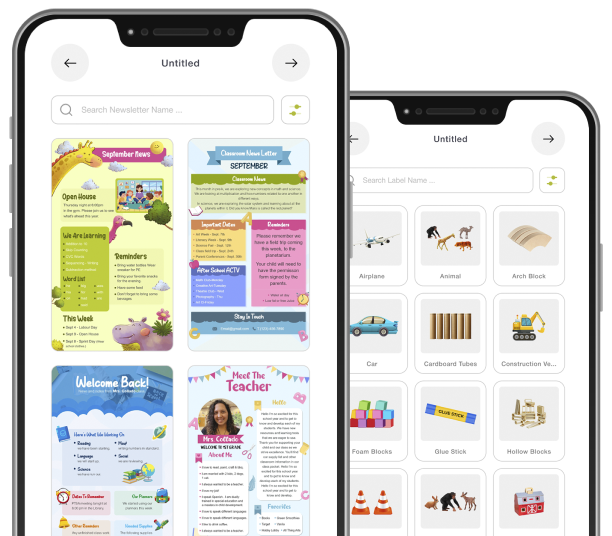
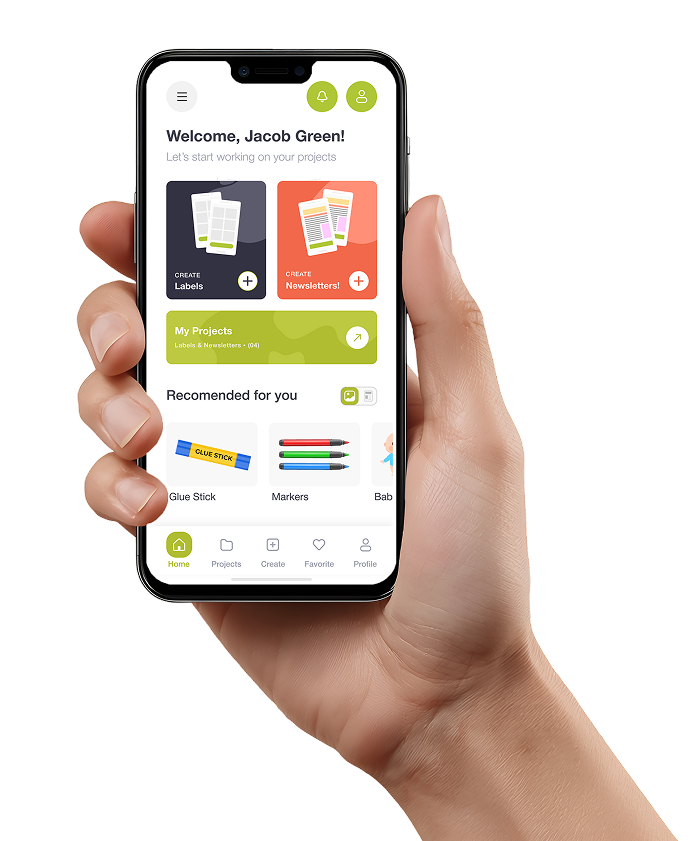
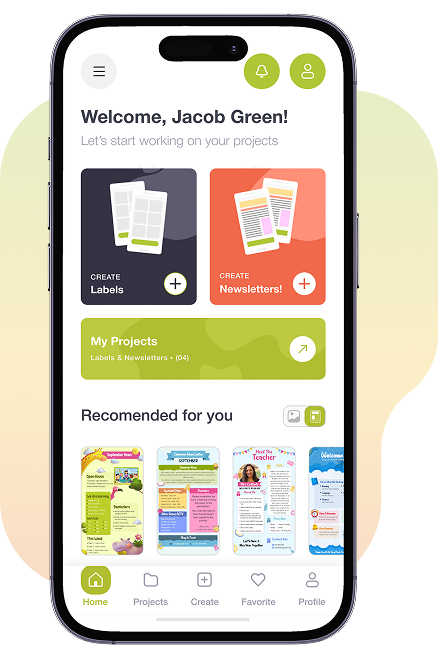
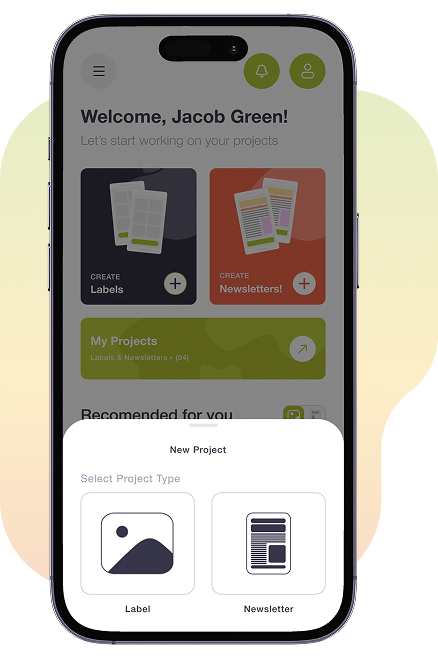
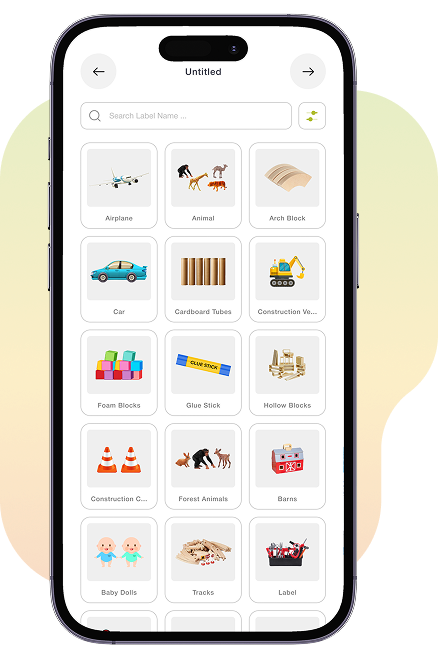
Getting started with Label N Learn takes less than two minutes. Register with your name and email, and you’re immediately taken to your personal home dashboard. From there, tap Create and choose what you need: a New Label or a New Newsletter. The New Label flow gives you a full library of templates organized by classroom theme, whether your room is safari-themed, color-coded by subject, or clean and minimal. Pick your design, add your text, and your label is ready to print. No design background required, no guesswork involved.

02

Fast and Simple Classroom Communication

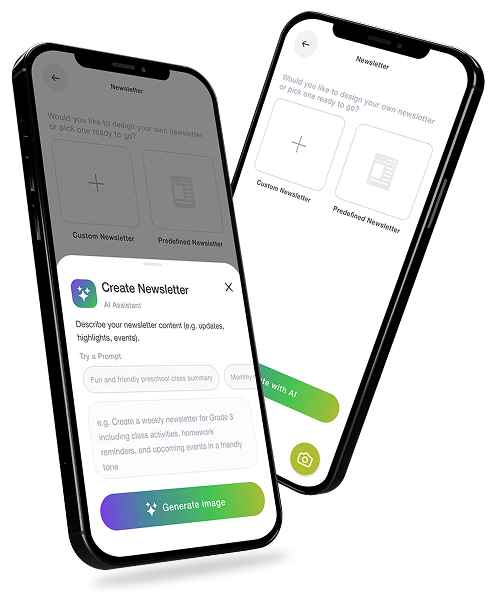
Parent communication doesn’t have to be a Sunday evening chore. The New Newsletter tool lets you write and format a professional classroom newsletter in minutes. Prefer a shortcut? Browse the pre-built template library and simply fill in your details. Want something uniquely yours? The Camera feature lets you photograph a classroom moment and build a label or newsletter section right around it. Every project you create is automatically saved in My Projects, so nothing gets lost and everything is a tap away when you need it again.

03

Created by Educators Who Understand the Classroom

Label N Learn was founded by Leanne Collado, a classroom teacher, and her husband Danny Collado, a U.S. Army veteran. Their mission was straightforward: give educators a tool that actually fits into the rhythm of a real school day. “We created Label N Learn to highlight the potential to transform classroom management and communications for educators, allowing teachers more time to focus on what matters most: the educating and inspiring of our students.” It’s the only dual-platform classroom app of its kind, available on both iOS and Android, with new features continuously in development.

A Feature-Rich Experience for Modern Educators

Custom Label Creation

A labeled classroom is a functional classroom. Label N Learn gives teachers a fast, flexible way to create labels for every shelf, bin, drawer, and station in the room. Choose from dozens of pre-designed templates sorted by classroom theme, or build your own from scratch. Adjust fonts, swap colors, resize elements, and have a print-ready label in your hands within minutes.

Newsletter Development

A well-written parent newsletter builds trust, keeps families informed, and strengthens the home-school connection. Label N Learn’s newsletter builder makes composing those updates genuinely easy. Write your content, drop it into a polished template, and you’re done, no formatting headaches, no wrestling with text boxes.

Project Storage & Sharing

Every label you design and every newsletter you write lives inside My Projects, your personal library of classroom-ready materials. No more hunting through old files or recreating something you made last semester. When you find a design that works, it’s saved and waiting for next time. Better yet, share your best work with colleagues directly through the app.

Project Storage & Sharing

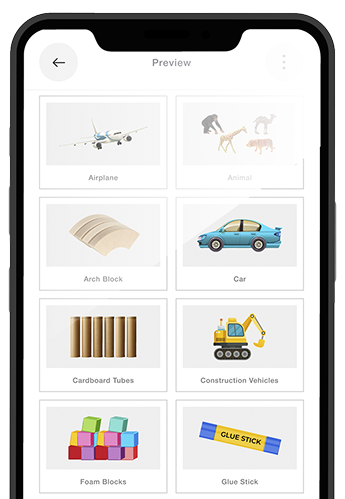
A beautiful label is only useful if it ends up on the shelf. Label N Learn’s built-in print and export tools make sure your work makes it off the screen and into the classroom. Print directly in multiple size formats to match your bins, binders, or boards, or export a crisp PDF to share with parents digitally, submit to an admin, or store for later.

AI Label Creation & Background Remover

Sometimes the best label idea starts with what’s already in your classroom. With Label N Learn’s AI-powered creation tool, point your camera at any classroom object, and the app does the heavy lifting, generating a custom label design with a clean, background-removed image at its center. The result is a professional, polished label that feels completely original because it is.

A Feature-Rich Experience for Modern Educators

Custom Label Creation

A labeled classroom is a functional classroom. Label N Learn gives teachers a fast, flexible way to create labels for every shelf, bin, drawer, and station in the room. Choose from dozens of pre-designed templates sorted by classroom theme, or build your own from scratch. Adjust fonts, swap colors, resize elements, and have a print-ready label in your hands within minutes.

Newsletter Development

A well-written parent newsletter builds trust, keeps families informed, and strengthens the home-school connection. Label N Learn’s newsletter builder makes composing those updates genuinely easy. Write your content, drop it into a polished template, and you’re done, no formatting headaches, no wrestling with text boxes.

Project Storage & Sharing

Every label you design and every newsletter you write lives inside My Projects, your personal library of classroom-ready materials. No more hunting through old files or recreating something you made last semester. When you find a design that works, it’s saved and waiting for next time. Better yet, share your best work with colleagues directly through the app.

Project Storage & Sharing

A beautiful label is only useful if it ends up on the shelf. Label N Learn’s built-in print and export tools make sure your work makes it off the screen and into the classroom. Print directly in multiple size formats to match your bins, binders, or boards, or export a crisp PDF to share with parents digitally, submit to an admin, or store for later.

AI Label Creation & Background Remover

Sometimes the best label idea starts with what’s already in your classroom. With Label N Learn’s AI-powered creation tool, point your camera at any classroom object, and the app does the heavy lifting, generating a custom label design with a clean, background-removed image at its center. The result is a professional, polished label that feels completely original because it is.

Custom Label Creation

A labeled classroom is a functional classroom. Label N Learn gives teachers a fast, flexible way to create labels for every shelf, bin, drawer, and station in the room. Choose from dozens of pre-designed templates sorted by classroom theme, or build your own from scratch. Adjust fonts, swap colors, resize elements, and have a print-ready label in your hands within minutes.

Newsletter Development

A well-written parent newsletter builds trust, keeps families informed, and strengthens the home-school connection. Label N Learn’s newsletter builder makes composing those updates genuinely easy. Write your content, drop it into a polished template, and you’re done, no formatting headaches, no wrestling with text boxes.

Project Storage & Sharing

Every label you design and every newsletter you write lives inside My Projects, your personal library of classroom-ready materials. No more hunting through old files or recreating something you made last semester. When you find a design that works, it’s saved and waiting for next time. Better yet, share your best work with colleagues directly through the app.

Project Storage & Sharing

A beautiful label is only useful if it ends up on the shelf. Label N Learn’s built-in print and export tools make sure your work makes it off the screen and into the classroom. Print directly in multiple size formats to match your bins, binders, or boards, or export a crisp PDF to share with parents digitally, submit to an admin, or store for later.

AI Label Creation & Background Remover

Sometimes the best label idea starts with what’s already in your classroom. With Label N Learn’s AI-powered creation tool, point your camera at any classroom object, and the app does the heavy lifting, generating a custom label design with a clean, background-removed image at its center. The result is a professional, polished label that feels completely original because it is.

Let AI Create Your Newsletters Instantly

Sitting down to write a parent newsletter at the end of a long school day shouldn’t feel like a second shift. Label N Learn’s upcoming AI newsletter feature changes that entirely. Describe what you want to say- a field trip recap, an upcoming event, a monthly classroom update- and the AI drafts a clear, well-structured newsletter for you. Edit what you want, keep what you love, and send it out in a fraction of the usual time. Your communication stays consistent and professional, even on your busiest weeks.

Hear from Educators Using Label N Learn

I used to dread setting up my classroom at the start of every school year because making labels always took an entire weekend. With Label N Learn, I had everything designed, printed, and on the shelves by Saturday afternoon. It genuinely gave me my Sunday back.

Lisa Paul Client

The newsletter feature alone is worth it. I used to spend a couple of hours every Friday putting together a parent update in a word processor. Now I open Label N Learn, pick a template, type my update, and I'm done before I finish my coffee.

Sarah Michael Client

Quote: "What really won me over was the My Projects section. I designed a full label set for my reading corner last fall and just pulled it up again this semester. I swapped a few colors and reprinted everything in ten minutes. That kind of time-saving adds up fast.

Jennifer Ronald Client

The PDF export is a feature more teachers should know about. I export my newsletters as PDFs every week and post them to our class portal. Parents love having a clean, formatted document instead of a plain email. It makes a real difference in how communication is received.

Amanda K. Client

Quote: "I shared my bin labels with three other teachers in my grade, and they were able to customize and print their own versions the same day. The collaboration feature is something I didn't know I needed until I had it; now I can't imagine going back.

Maria Tyler Client

I was skeptical at first. I've tried other classroom apps that promised a lot and delivered very little. Label N Learn is different. It's clearly made by someone who actually understands what a classroom day looks like and what teachers realistically have time for.

Danielle Watson Client

Quick Answers for Busy Teachers

What is Label N Learn?
Label N Learn is a mobile app built specifically for classroom teachers. It combines label creation, newsletter writing, project storage, and print-ready output in a single teacher-friendly platform. Available on both iOS and Android, it’s designed to save educators time and reduce the daily prep that pulls focus away from teaching.
Yes, new users get a free trial period with full access to the app’s features from the moment they register. Just download the app, sign up with your name and email, and start creating right away. No credit card is required to begin your trial.
Once you’re logged in, tap the Create button on your home screen and select New Label. You’ll be taken to the template library where you can browse by theme or start from a blank canvas. Choose your layout, enter your text, adjust the design to your liking, and tap Print or Save. Your first label can be ready in under five minutes.
Absolutely. Every template in Label N Learn is fully customizable. You can change fonts, colors, and sizing, swap out design elements, and adjust layouts to match your classroom’s look and feel. The app is built around the idea that no two classrooms are alike, so no two Label N Learn designs need to be either.
Label N Learn supports printing in multiple size formats directly from the app. You can also export any project as a PDF file, which is ideal for digital sharing with parents, printing through a school printer, or archiving for future use. The flexibility means your materials work whether you need them on paper or on a screen.
Yes. Label N Learn is available on the Apple App Store for iOS devices and on the Google Play Store for Android devices. It’s built to work seamlessly on both platforms, so your entire team can use it regardless of which phone or tablet they prefer.

Download Everything You Need to Organize Your Classroom, In One App

Stop losing evenings to labels and newsletters. Label N Learn gives you professional classroom tools that are fast, flexible, and built around how teachers actually work. Download the app today, start your free trial, and see what your classroom looks like when the prep work stops getting in the way.

Get in Touch

Got a question about a feature? Running into an issue with the app? Want to share feedback or just say hello? We’re a small, teacher-focused team, and we take every message seriously. Reach out; we’d love to hear from you.

Email

contact@labelnlearn.com

Phone

(555) 555 5555

Leave Us a Message

And we’ll get back to you as soon as possible. Fill out the form below, and our team will be happy to assist you.